The best press release writer AI tools ask for your announcement in structured fields, return a draft in the standard release layout, and let you edit before you copy it out. For a free first draft with no login, start with LogicBalls or Voilà AI. Easy-Peasy.AI suits multilingual drafts, and GravityWrite suits anyone who wants clear sections. ClickUp fits teams that need sign-off, and Prowly fits anyone who also wants to pitch journalists from the same screen.
The trouble is that most free generators produce something that looks right and reads like every other release. Generic phrasing, invented quotes and missing facts are what editors delete in seconds. A tool will not fix a weak announcement or a thin brief.
This guide covers what to look for, eight tools with what they cost and where each one stops, a prompt you can copy, and the point where a human writer is the better call. Purple Word Box writes and pitches press releases for South African businesses, so the editing advice comes from doing this work for a living.
What to look for in an AI press release writer
Five features that separate useful tools from toys
A useful AI press release writer collects your facts in structured fields, outputs the standard release layout, lets you set the tone, and leaves room to edit. Anything less leaves you rewriting from scratch. Check these five before you spend time on a tool:
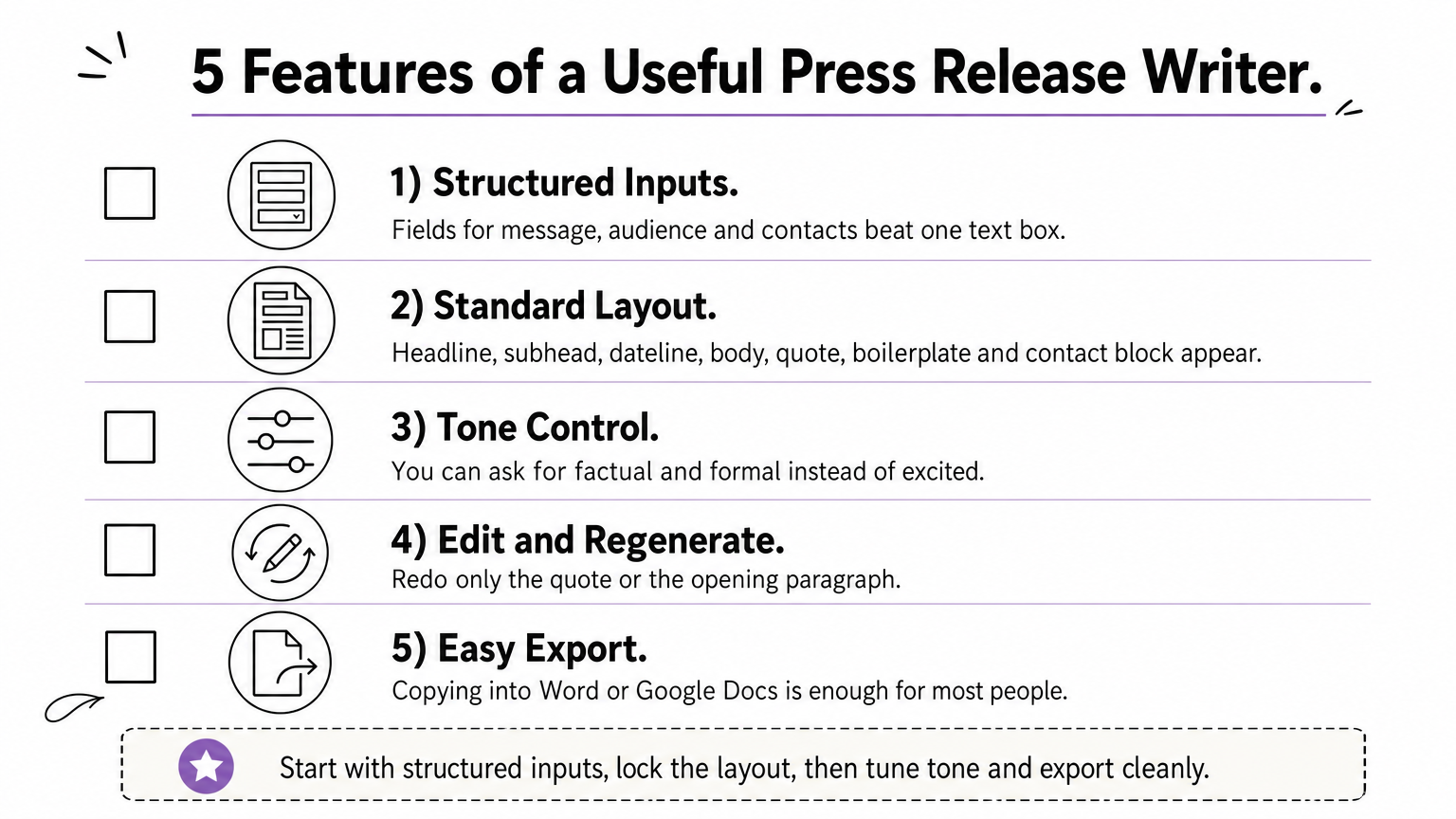
- Structured inputs. Fields for release type, key message, audience and contact details beat a single text box.
- Standard layout. Headline, subhead, dateline, body, quote, boilerplate and contact block should appear in the draft or as placeholders.
- Tone control. You should be able to ask for factual and formal instead of excited.
- Editing and regenerating. Redoing only the quote or the opening paragraph saves time.
- Export. Copying into Word or Google Docs is enough for most people.
A press release generator can only format the facts you give it, so your input sets the ceiling on the output.
Language settings matter too. South African editors expect British-style spelling, such as "organisation" and "programme", and many generators default to US spelling. Pick a tool with a language option, or state the spelling you want in the prompt.
The eight picks at a glance
Here are the eight tools side by side, with how you can start each one and its main limit. Prices below are in US dollars as the tools list them, so the rand cost moves with the exchange rate.
| Tool | How you start | Best for | Main limit |
|---|---|---|---|
| LogicBalls | Free, no login | Fast drafts with suggested quotes | No SEO features |
| Voilà AI | Free, no account | Correctly structured drafts | No team sharing or distribution |
| Rewind | Free, no sign-up | One-off first drafts | Few controls to steer the output |
| Easy-Peasy.AI | Free account | Multilingual drafts | No quote or media contact layout |
| GravityWrite | Free plan, 1,000 to 2,000 words a month | Drafts with set sections | Small free word cap |
| Copy.ai | Free plan, 2,000 words in chat | Opening paragraphs and variations | Paid plans start at $49 a month |
| ClickUp | Free plan | Teams with approval steps | No distribution |
| Prowly | 7-day free trial | Drafting plus journalist pitching | Not free after the trial |
Plans change often, so confirm current limits and prices on each tool’s own site before you commit.
1. LogicBalls
What it does
LogicBalls turns a short brief into several press release drafts. You type the topic, choose a tone (professional, neutral or conversational), and optionally add your executives’ names so the tool suggests quotes for them. Then you copy the draft you like into your own document.
The appeal is speed. There is no login, so you can test it with a real announcement in a couple of minutes. A one-line brief still gives you a generic release, so add the date, the numbers and the reason the news matters before you generate.
Who it suits
LogicBalls suits founders and small marketing teams who need a first draft today and have nobody to write it. It also lets you compare several framings of the same news side by side, which helps when you are unsure what the lead should be.
One warning on quotes. The tool writes words for your executive, but the executive never said them. Rewrite the quote or get the named person to approve it before the release goes anywhere.
An AI-written quote is a placeholder, and it only becomes a statement once the named person approves it.
Cost and limits
The tool is free, with no trial restrictions and no account. There is no built-in SEO keyword feature, and the long list of other writing tools on the site can make the press release page hard to find at first. It has no distribution or media contact features, so you send the release yourself.
2. Voilà AI
What it does
Voilà AI asks for your company name, the announcement and your key messages. You pick a language and a tone (neutral, formal or casual), and it returns a formatted press release. Its strength is structure: the draft follows the layout journalists expect, so you restructure less.
It supports multiple languages, which helps if you write for international media as well as local outlets. Because it formats for you, the weak spot is the content, so supply specific facts.
Who it suits
This tool suits first-time release writers and small-business owners who have the facts but not the format. It also works as a check on your own work. Paste your facts in, then compare its layout with the one you were about to send.
If you fix only one thing in a first release, fix the order: news first, quote second, company details last.
Cost and limits
Voilà AI is free, with no account and no card. Nothing is built in for team review, and it has no distribution or analytics tools. Review the draft in a shared Google Doc and send it by email, which costs nothing and works fine for a single announcement.
3. Rewind
What it does
Rewind offers a free AI press release generator. Its page says there is no charge and no sign-up needed to start. You give it your announcement details and it returns a draft you can work from.
Because it asks for little up front, the output depends almost entirely on the detail you paste in. Treat the first result as raw material, not a finished release, and check every figure it repeats.
Who it suits
Rewind suits one-off needs, such as an owner who has to announce a new branch or a staff appointment and wants something to react to. It is also a handy second opinion. Run the same brief through two tools and the phrases that appear in both are usually boilerplate you can cut.
Do not expect a workflow around it. It is a place to get words on the page, and your edit is what makes them publishable.
Running one brief through two generators shows you which phrases are filler.
Cost and limits
The tool is free to start, and the page promises no sign-up. Tools that need no account usually cannot save your work, so copy the draft out straight away. Check the dateline, the boilerplate and the contact block by hand, since you cannot assume the tool filled them in correctly.
4. Easy-Peasy.AI
What it does
Easy-Peasy.AI has a large template library, and one template is built for press releases. You enter the product or service name, the announcement topic and any keywords, then choose a tone (professional, friendly or formal). It returns multiple drafts so you can pick the strongest.
It supports more than 40 languages. Premium models on the paid plans give higher-quality output, but the free tier is enough to learn how the tool behaves.
Who it suits
It suits startups, nonprofits, small PR teams and event organizers who want a simple starting point without learning a complicated dashboard. If you need a release in more than one language, check that your exact language is on the list, because support quality varies from language to language.
For a release in a second language, have a fluent speaker read the AI output before it goes out.
Cost and limits
You need a free account, and the free tool has no limit on the number of generations. Paid plans add the premium models and better customization, and pricing depends on the plan you choose. The weak points are no detailed layout for quotes and no media contact section, so you add both yourself. You also need a separate way to publish or send the release.
5. GravityWrite
What it does
GravityWrite guides you through the release. You pick the press release template, answer three questions (the type of release, the main news, and extras like date, location and contact details), and it builds a headline, lead, dateline, body, boilerplate and contact block.
When you leave a detail out, it inserts a placeholder such as [CITY] or [INSERT NAME] instead of guessing. That is a sound design choice, because a visible gap is easier to fix than a confident invention.
Who it suits
GravityWrite suits people who want a draft that looks media-ready without thinking about structure. Fill every placeholder before you send, and read the text for anything the tool added that you did not supply.
A placeholder is a feature, because a visible gap is easier to fix than a confident invention.
Cost and limits
The free plan includes the press release generator and gives you 1,000 to 2,000 words a month with limited templates. At roughly 400 words a draft, that is two to five drafts a month, fewer if you regenerate. Paid plans scale from there:
| Plan | Price | Words per month | Extras |
|---|---|---|---|
| Free | $0 | 1,000 to 2,000 | Limited templates |
| Starter | $19 a month | 75,000 | 100+ templates |
| Pro | $79 a month | 250,000 | 30+ languages, multi-device access |
On Starter, 75,000 words covers about 180 drafts of 400 words, far more than most businesses need. It has no SEO keyword support, and finding the template among many tools can take a minute.
6. Copy.ai
What it does
Copy.ai’s press release tool takes your company description, the announcement and your key points, then returns options in seconds. A "More Like This" button generates variations of a version you liked, and a built-in editor lets you adjust the wording.
Test it with your own announcement and check whether it gives you the whole release or mostly strong opening paragraphs. Either is useful, but you need to know which you are getting before you plan your time.
Who it suits
It suits writers who already have most of the story and want better leads and more options to choose from. It also fits content teams that use the platform for other writing, since a general writing subscription justifies its price more easily than a single use.
Pay for a writing tool only if you will use it every week, not once a quarter.
Cost and limits
Copy.ai has a free plan with one seat, 2,000 words in chat, and basic tools and models. At about 400 words a draft, that is around five drafts before you hit the cap, with no room for retries. Starter costs $49 a month for one seat with unlimited chat words. Advanced costs $249 a month for up to five seats and 2,000 workflow credits. For one release a month, the free plan is the sensible choice.
7. ClickUp
What it does
ClickUp is a work-management tool with AI built in. You give ClickUp Brain the key details (the announcement, the audience, the tone) and it drafts a release. You then refine it in ClickUp Docs, where colleagues can comment and tag each other in real time.
The real value is the process around the draft. You can create tasks for writing, review, legal check and distribution, assign each to a person, and track status. There is also a free press release template if you prefer to start from a standard structure.
Who it suits
ClickUp suits teams where a release needs sign-off from legal, executives or partners. If you write alone, it is more setup than you need. If three people must approve every announcement, a shared doc with task tracking stops drafts from getting lost in email threads.
The longest delay in most press releases is the approval chain, not the writing.
Cost and limits
The free plan costs $0 and covers basic docs, tasks, boards and 100MB of storage. Unlimited is $7 per user a month, and Business is $12 per user a month. For a team of four, that is $28 a month on Unlimited or $48 on Business. Confirm what ClickUp Brain costs on your plan, since AI features are sometimes priced separately. It does not distribute releases, so you send them yourself.
8. Prowly
What it does

Prowly’s AI follows a guided flow. You choose the release type (product launch, survey or report, or announcement), the audience and the language, then enter three key messages. The AI asks ten follow-up questions, shaped like the ones a journalist would ask, which fills gaps before an editor has to chase you.
You then set the tone and edit. An AI assistant reviews the draft against 11 criteria and flags where to improve. After you type about 100 words, it also suggests journalists from a database of over a million contacts and drafts the pitch email and subject lines.
Who it suits
Prowly suits in-house comms staff and PR practitioners who write and send releases regularly and want drafting and pitching in one place. Presscloud is a similar platform. It says its generator writes a release in about a minute from your inputs plus your website and social media, and it cites 81,000+ journalists.
A big database says little about your market. Before paying, ask how many South African outlets and reporters it covers, and plan to build your own local media list.
A media database is only worth its size if it includes the editors who cover your industry in your country.
Cost and limits
Prowly offers a 7-day free trial, and you pay after that. Check its current pricing, because the cost matters less than whether the journalist coverage fits your market. The AI drafts and pitches, but it cannot judge your news angle, so a weak story stays weak.
How to get a publishable release from an AI draft
Brief the tool with facts, not adjectives
Give the tool the who, what, when, where and why, with numbers, and leave out the praise. The output copies your level of detail, so a vague brief returns vague copy. Prepare these items before you open any generator:
- The news in one sentence.
- The date and the city.
- One or two hard figures, such as a rand amount, a percentage or a count.
- Who is affected and why they should care.
- A named spokesperson who will approve the quote.
- A two-sentence company description.
- A contact name, phone number and email address.
Editors want news, not self-praise. Words like "leading", "innovative" and "world-class" add nothing and mark the release as promotional.
If a sentence would survive in any company’s release, it does not belong in yours.
A prompt you can copy
Paste this into any generator, replace the brackets, and keep the last two lines. The "[MISSING]" rule stops the tool from inventing figures to fill a gap.
Write a press release for South African business media.
Release type: [product launch / partnership / appointment / event / results]
The news in one sentence: [your headline fact]
Company: [name and what it does, in one line]
What changed: [the new thing, with numbers]
When and where: [date, city]
Why it matters: [benefit to customers or the market, with one proof point]
Spokesperson: [name and title] (I will supply the quote wording: "[your words]")
Boilerplate: [two sentences about the company]
Contact: [name, phone, email]
Tone: factual and plain. No hype words.
Length: 350 to 400 words. Use British-style spelling (organisation, programme).
Use only the facts above. Mark anything missing as [MISSING]. Do not invent figures or quotes.
Supplying the quote yourself is the key move. You keep control of what your spokesperson says, and the tool only has to place it.
The edit pass before you send
Run this checklist on every AI draft, whichever tool wrote it:

- The headline states the news in plain words.
- The first paragraph answers who, what, when, where and why.
- Every number matches your source document.
- The quote sounds like the speaker and has their approval.
- Spelling, rand amounts and the city in the dateline suit a South African reader.
- The boilerplate and contact details are current, and the person listed will answer the phone.
- No sentence relies on hype words to carry meaning.
Then send it properly. Paste the release into the email body with a two-line pitch on top, because many journalists skip attachments. Most releases run 300 to 500 words, so cut anything that does not help an editor decide.
When AI is enough and when to hire a writer
Where AI drafts fall short
AI is enough when your announcement is routine and your facts are clear. It falls short when the story needs judgment. A tool cannot decide which angle an editor will care about, cannot verify your claims, and does not know which reporters cover your sector. It may also invent quotes or statistics, so you must check every line.
Even a perfect release does not guarantee coverage. Editorial decisions sit with journalists and editors, and no tool or agency controls that. What you can control is the clarity of the story and how well it is pitched.
When a PR writer is worth the cost
A human writer earns their fee when the announcement matters, such as a funding round, a leadership change or a launch you need in the mainstream press. A senior practitioner will tell you honestly if the story is not news yet and help you find the angle that is.
At Purple Word Box, Maria Joubert brings more than 20 years of PR experience, including 11 years at agencies in the UK. We write press releases and media pitches, place content, and can manage PR for UK and US brands launching in Africa. The sensible mix for most businesses is to use AI for routine drafts and a PR professional for the stories that carry your reputation.
Use AI to save time on routine announcements, and use a PR professional when the story carries your reputation.
Start with one tool, then edit hard
Pick one tool from this list and test it on a real announcement. The free options, LogicBalls, Voilà AI, Rewind and Easy-Peasy.AI, cost you nothing but ten minutes. GravityWrite helps if you want set sections, ClickUp helps if approvals slow you down, and Prowly helps if you also want to pitch.
Whatever you choose, the pattern is the same. Give the tool specific facts, supply the quote yourself, mark gaps instead of letting it guess, and run the edit checklist before sending. The draft is the easy part, and the story and the edit decide whether an editor reads on.
If the announcement is too important to leave to a template, talk to Purple Word Box about your press release and we will tell you honestly how best to get it noticed.